
Google continues to refine the everyday user experience of its ubiquitous email client, introducing a practical feature designed to streamline one of the most common digital friction points: handling two-factor authentication. Hot on the heels of rolling out advanced features like Live search and chat capabilities earlier this month, Gmail is now deploying a dedicated “Copy code” button directly within the mobile applications for Android and iOS. This latest quality-of-life upgrade aims to save users valuable seconds and eliminate the tedious switching back and forth between apps when logging into various secure online services.
For years, the standard routine for handling email-based two-factor authentication has involved a familiar dance of notifications and app-switching. When a user attempts to log into a bank account, retail platform, or subscription service, the platform typically dispatches an automated email containing a six-digit verification code. Previously, the user had to leave the target application, open the Gmail app, locate the incoming message, open the email itself, carefully highlight the numeric code, tap copy, and then return to the original app to paste the credentials. While functional, the multi-step process offered plenty of room for friction, particularly when dealing with mobile operating system multitasking or slow-loading email threads.
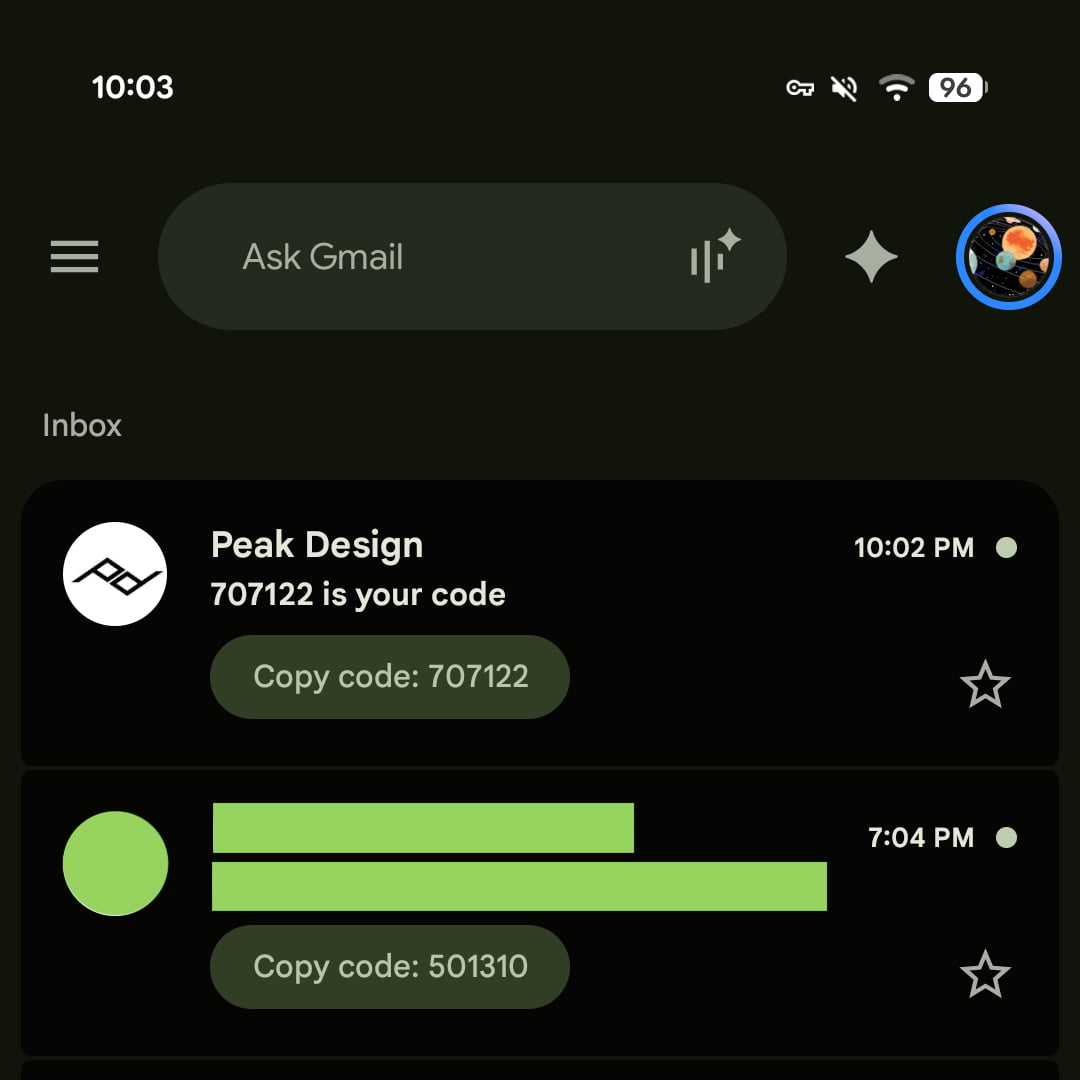
The new implementation fundamentally changes this workflow by bringing the most critical piece of information directly to the surface of the inbox. Instead of forcing the user to open an individual email to select and copy the numeric sequence, Gmail now displays a smart shortcut right underneath the subject line in the main message list view. This pill-shaped button, displaying the clear label accompanied by the active code, appears in a manner visually similar to the previews already utilized for images, documents, and other file attachments.
In early testing across various accounts, the shortcut has proven immediately responsive. Tapping the pill-shaped button instantly copies the numerical sequence to the device’s clipboard. From there, the user can immediately switch back to the designated banking, retail, or utility application and paste the code with a single long-press or tap. Initial evaluations confirm that the feature functions reliably for a wide range of common transactional messages, including those originating from major online storefronts and financial institutions.
The feature represents a thoughtful approach to interface design, addressing a micro-annoyance that mobile users encounter multiple times a week. Two-factor authentication has become a mandatory security baseline for the modern web, protecting everything from personal social media profiles to sensitive corporate networks and financial assets. By reducing the logistical friction associated with retrieving security codes, Google is effectively removing a subtle barrier that sometimes discourages users from adopting rigorous security habits.
The rollout is currently underway for users running specific software iterations of the email application. The "Copy code" button is actively appearing in Gmail for Android, specifically arriving with version 2026.09.07.x, as well as on Apple’s mobile ecosystem for iOS users running version 6.0.260907. However, the functionality is currently constrained to the dedicated mobile applications and has not yet made its way to the web-based desktop interface.
As users and tech observers evaluate the new capability, many are already noting potential avenues for further refinement. Beyond the main inbox interface, mobile users frequently interact with incoming messages through system-level notifications on their lock screens or drop-down shade panels. Integrating a similar quick-copy shortcut directly into Android and iOS email notifications represents an obvious next frontier for the feature, potentially cutting out the step of even opening the Gmail app itself.
For now, the introduction of the inbox-level copy shortcut stands as a welcome and frictionless upgrade for millions of daily communicators. As digital security measures continue to evolve alongside user expectations, small interface adjustments like this demonstrate how major tech platforms can make robust security practices feel just a little bit more seamless in everyday life.