
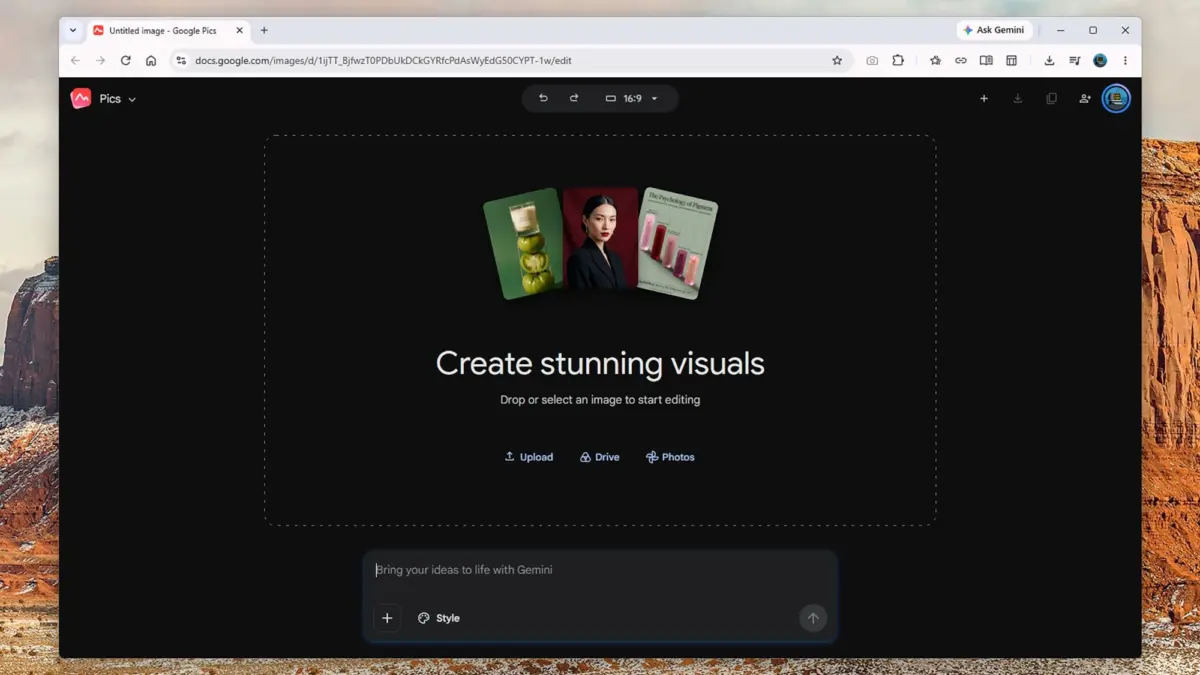
Google has officially introduced Google Pics, a new graphic design and image editing web application integrated directly into the Google Drive Workspace environment. Sitting alongside established productivity tools like Google Docs, Slides, and Sheets, the latest platform attempts to bridge the gap between AI-driven content generation and everyday document creation.
The application is currently rolling out to users subscribed to the tech giant’s higher-tier plans, specifically Google AI Pro, which is priced at $19.99 a month, and Google AI Ultra, costing between $99.99 and $199.99 a month. The rapid pace at which Google frequently launches and retires software products has made it challenging for users to track its evolving ecosystem, but Google Pics arrives as a prominent addition positioned squarely at the intersection of graphic design—similar to Canva—and detailed photo manipulation reminiscent of Photoshop.

Powered by the Nano Banana AI image generation model, the web application functions both as a standalone service and as an embedded tool designed to pop up contextually across other Google Workspace applications whenever users require visual assets. For subscribers of the qualifying AI tiers, the software aims to serve as a comprehensive image creation hub that minimizes the need to jump between multiple third-party programs.
Driving the platform is a prompt-centric interface. From the initial opening screen, users can enter detailed text prompts to generate completely new graphics from scratch or to modify existing images. The system behaves similarly to conversational AI models like Gemini, where increased detail and descriptive phrasing yield more accurate results. A dedicated Style box allows creators to provide reference imagery to guide the overall aesthetic, while options to upload files directly or pull media from Google Drive and Google Photos facilitate immediate editing workflows. Additionally, an aspect ratio drop-down menu at the top of the interface enables users to specify dimensions for new creations before generation begins, though these parameters can also be adjusted later.
When generating fresh images, Google Pics presents four or five alternative thumbnail options on the left-hand side of the screen, allowing users to browse through the variations and select the ideal asset. Users also retain the option to prompt the system to generate additional iterations, though doing so consumes platform usage allowances. True to form for many modern AI deployments, Google has provided relatively flexible guidelines regarding generation limits, noting that users will enjoy "higher access" levels until February 2027, with constraints influenced by variables such as output image resolution.

Demonstrating the practical application of the software, testing the platform with a prompt to design an A5 flyer for a child’s birthday party yielded vibrant, professionally styled promotional materials within seconds. The generated options successfully incorporated the requested details—such as specific times, locations, and supplementary informational text—while bearing the familiar polished sheen common to contemporary AI-generated graphics found on promotional menus and community event notices.
Beyond creating new assets from scratch, the platform handles existing photographs by applying stylistic transformations. Users can seamlessly convert standard pictures into watercolor paintings or comic-book illustrations, effectively utilizing the software as an expansive collection of digital filters. While the outcomes may occasionally require minor adjustments, the generated effects prove robust enough for casual graphic design needs.
Despite its versatility, Google Pics remains a relatively streamlined application. Core editing controls are limited to undoing recent actions, zooming, and altering aspect ratios. The platform lacks traditional manual drawing utensils, touch-up instruments, and foundational features like layer support, indicating that professional designers will still rely on traditional dedicated suites like Photoshop and Canva for advanced, pixel-level precision work.

Where Google Pics distinguishes itself most notably is within its intelligent editing suite, which activates once an image has been either generated or uploaded. The application automatically detects discrete elements within a composition—such as a sky, a church, or a mountain range—allowing users to click directly on those specific regions to open contextual prompt boxes for targeted modifications. Alternatively, users can manually draw a selection box around any object within the frame, such as altering the color of a specific party balloon or removing an unintended background figure from a family vacation photograph.
While AI-driven object removal relies heavily on predictive guesswork to fill in obscured backgrounds, the system generally produces clean results that conceal the digital alterations from casual observation. However, highly complex edits involving dense foregrounds or intricate background details—such as removing multiple moving vehicles from a crowded street scene—can occasionally push the limits of the AI’s current capabilities.
Users can also queue multiple edits and apply them simultaneously, streamlining workflows by eliminating the need to process adjustments sequentially. For text-heavy designs like flyers, users can select blocks of written content and modify the text directly without requiring a brand-new generation prompt. This capability extends to broader imaginative manipulations, ranging from major environmental shifts, such as transforming a daytime photograph into a night scene, to subtle atmospheric touches like adding individual clouds. More complex conceptual changes, such as aging a vehicle within a scene by several years, demonstrate how the platform can accomplish specialized editing tasks that would typically require advanced software proficiency and significantly more time.

While these generative capabilities significantly expand the boundaries of casual image editing, they are unlikely to fully replace traditional desktop software in professional environments. Tasks requiring meticulous precision, multi-layered compositing, and strict adherence to specific artistic visions still necessitate dedicated programs like Photoshop and Canva. Nevertheless, the deep integration of Google Pics within the broader Workspace ecosystem positions it as a practical and accessible asset for everyday productivity and creative tasks.