
Linux Mint has long earned a reputation as one of the most reliable, user-friendly, and stable operating systems available in the open-source ecosystem. Designed to provide a familiar and welcoming environment for users transitioning from proprietary operating systems like Windows or macOS, it relies primarily on the Cinnamon desktop environment. However, critics and casual observers have occasionally pointed out that out-of-the-box installations of Linux Mint can sometimes look traditional, conservative, or outright dated compared to the sleek, ultra-modern aesthetics found on some competing distributions and desktop shells.
Yet, beneath its conventional exterior, the Cinnamon desktop is remarkably flexible and highly customizable. It serves as a robust foundation for community-driven creativity, allowing designers and developers to drastically alter its appearance without sacrificing its underlying stability. A striking new transformation pack demonstrates this potential to eye-catching effect, challenging the notion that Linux Mint cannot compete with more modern-looking desktop environments when it comes to visual flair.
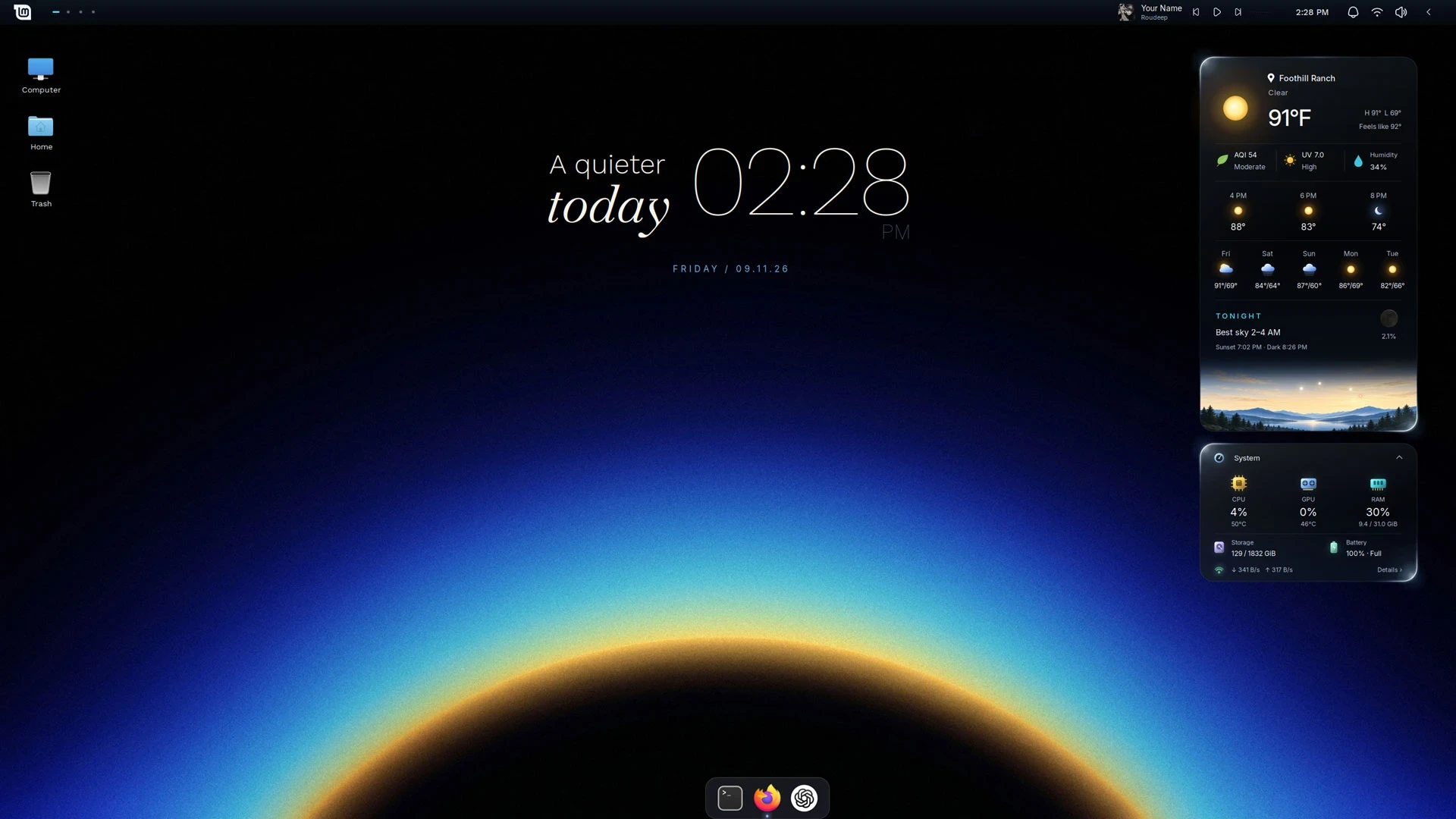
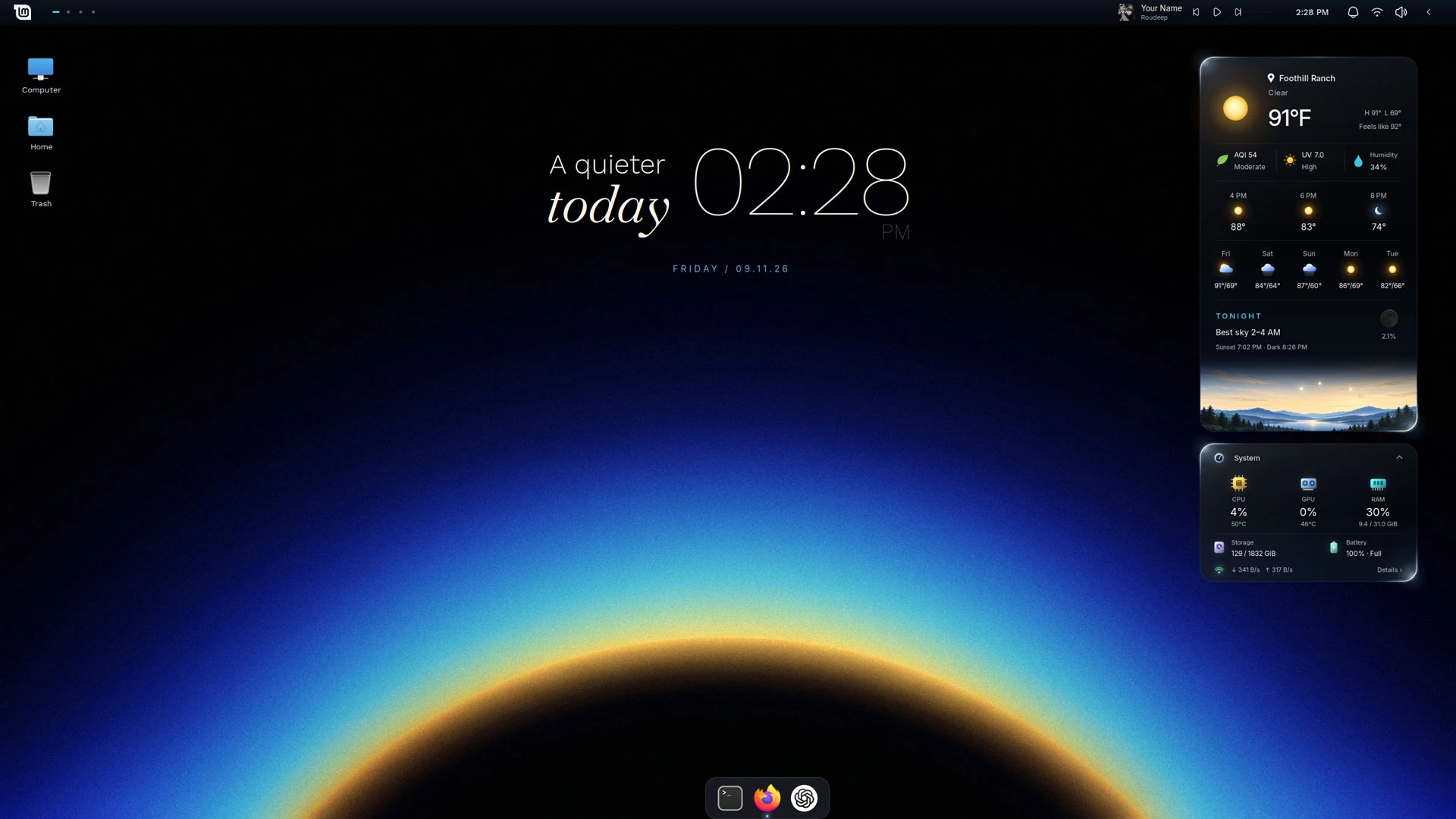
The project, known as "Silent Horizon," is a comprehensive Linux Mint makeover pack composed of custom desklets, panel applets, tailored wallpapers, a Plank dock theme, and subtle layout tweaks tailored specifically for the Cinnamon desktop. Developed by a community member known online as PersianVibeCoder, the package aims to forge a calm, minimalist desktop environment infused with small, dynamic details that make the interface feel genuinely alive. While these dynamic elements certainly enhance the aesthetic appeal of the desktop, they also introduce performance trade-offs that users on lower-spec hardware should carefully consider before diving in.
At first glance, the visual impact of Silent Horizon is immediately apparent through its carefully curated widgets. The transformation introduces custom weather and system monitor desklets that feature a distinctive running rim light, which continuously circles the perimeter of each card. Beyond this decorative lighting effect, the illustrated horizon card embedded within the weather desklet offers a deeper functional layer. Far from being a static background image, it functions as a live horizon view that shifts dynamically over the course of the day. The card accurately portrays the changing positions of the sun, the moon, and major planets whenever they are visible above the horizon in the user’s actual geographical location.
Complementing these striking weather and system monitor cards—which can be conveniently expanded or collapsed depending on user preference—is a highly configurable desktop clock widget. Tying the entire visual ecosystem together is a cohesive collection of panel applets known as the "Quiet Line" set, arranged neatly along a single desktop panel. This setup includes a GNOME Shell-style workspace switcher and an integrated "Now Playing" media controller that communicates seamlessly with MPRIS-compatible players. The controller not only displays album artwork for currently playing tracks but also features an embedded, Cava-powered sound meter that pulses in real-time with system audio.
To round out the desktop transformation, the package incorporates the Plank dock, styled with a custom theme designed to mirror the glassy, translucent aesthetic of the desklet cards scattered across the desktop. The result is a genuinely transformative set of changes that completely reimagines the default Linux Mint experience. Because the modifications are handled carefully through scripting, the changes are also easily undone if the user decides to revert to the default configuration.
However, these visual enhancements come at a noticeable cost to system performance. On lower-powered machines, the continuous rendering required by the animated desklets and real-time audio meters can drive CPU usage significantly higher than normal. For instance, testing the transformation pack on a modest Chuwi laptop equipped with an Intel m3-8100y processor and 8GB of RAM—hardware that typically runs a full-scale Ubuntu installation without issue—revealed a substantial performance penalty, causing the system to crawl under the added computational load.
How to Apply the Silent Horizon Makeover
For users eager to experience the transformation firsthand, preparation and caution are strongly recommended. Linux Mint includes a built-in system backup tool, and creators of community customization scripts universally advise running a full backup prior to installation. If anything unexpected occurs or if the user simply dislikes the final result, having a reliable backup provides an immediate safety net, complementing the uninstallation script provided within the download package itself.
Silent Horizon is engineered specifically for the Cinnamon desktop environment and has been rigorously tested primarily on version 22.3, which serves as the core of Linux Mint 22.3. Users should also note that the creation of the transformation pack was aided in part by modern AI tools.
To begin the process, interested users can download the latest release directly from the project’s official GitHub releases page and extract the contents of the ZIP archive. Inside the extracted directory lies an executable bash script. Before executing any code downloaded from the internet, security-conscious users are encouraged to carefully inspect the installation script and the associated Python scripts in a text editor to ensure complete transparency and peace of mind.
Once verified, the folder can be opened within a terminal window to run the primary installation script. The script automatically handles the fetching and installation of necessary dependencies and packages that might not be present on a standard system installation, such as the Plank dock and the Cava audio visualizer. After the installation routine finishes successfully, users must log out of their current desktop session and log back in. This final step is crucial, as the various components, configurations, and applets that make up Silent Horizon require a fresh session context to initialize properly and click together as intended.
Users are advised to retain the downloaded folder rather than deleting it immediately, as it contains the dedicated uninstaller script needed should they wish to remove the modifications later. Upon logging back in, the desktop environment should closely resemble the promotional screenshots, though minor adjustments may be required to optimize the layout for specific screen resolutions. Users can easily access individual configuration panels by right-clicking directly on the desklets, allowing them to input their precise geographic location, adjust the interface scaling, and fine-tune other personal preferences to match their workflow.