
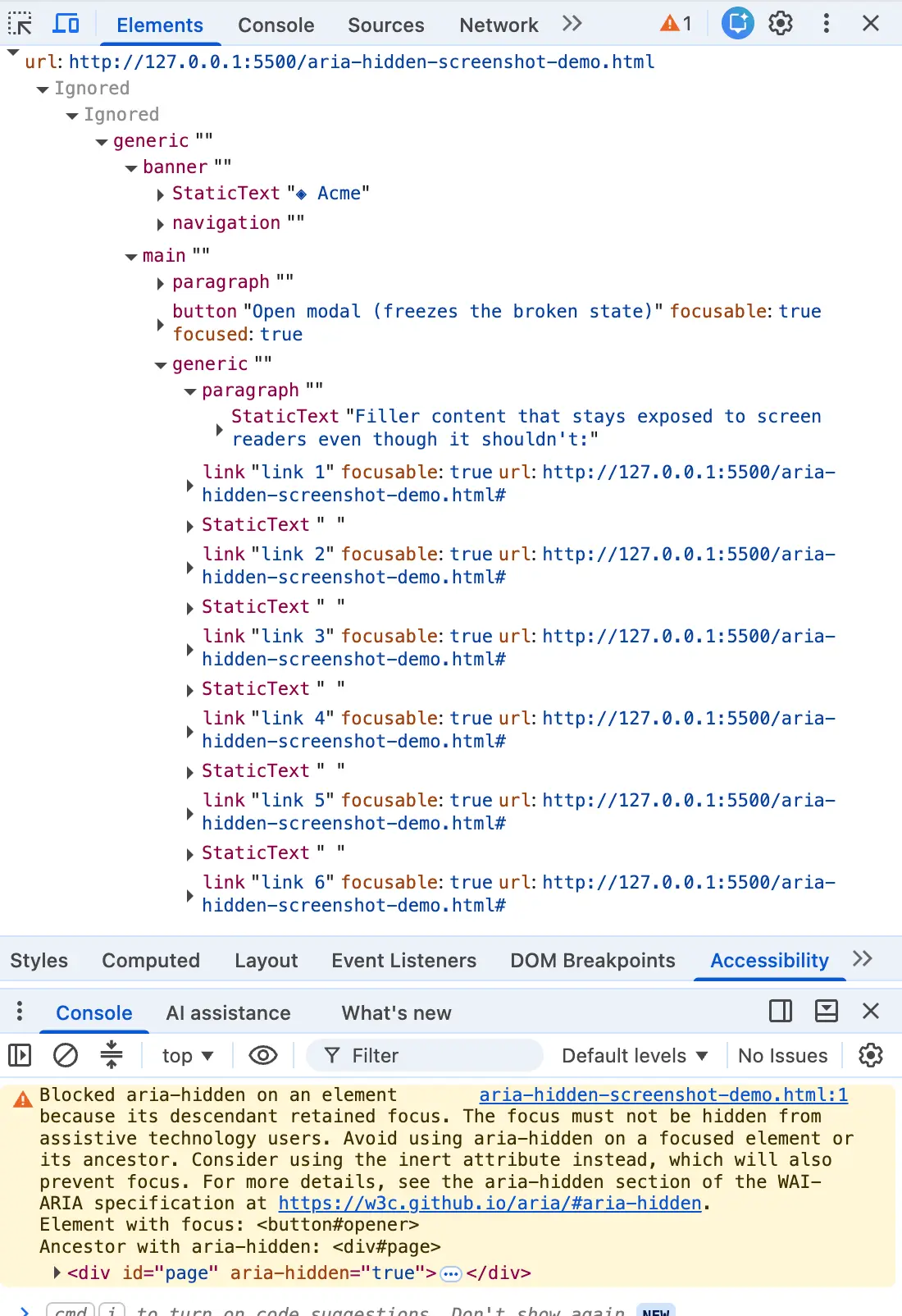
You closed a dialog box, and your browser’s developer console lit up in a shade of angry mustard. You highlighted the diagnostic message, dropped it into a search engine, and landed on a page shared by half the front-end internet. Whether you are working in Angular, Bootstrap, Ionic, or phpMyAdmin, this exact character string turns up identically.
Yet, the top search results routinely bury the most critical truth: the warning is correct. There is a real person on the other side of that interface—someone using a screen reader whose focus is about to drop into a hole in your page.
The most common fixes currently ranking online all essentially do the same thing under different names. Developers apply the blur() one-liner, wrap their close events in a setTimeout, or strip the aria-hidden attribute entirely. Each of these approaches quiets the console while quietly harming the user the browser was trying to protect. If you have already shipped one of these quick fixes, you are in enormous company. You were failed by your search results, not by carelessness.
For developers in a hurry with the option to do so, migrating to the native <dialog> element and calling .showModal() solves the problem instantly. The browser handles the entire focus dance, and this class of bug all but disappears, though developers still must handle cases where the target focus element has been removed from the Document Object Model (DOM). For everyone else wired into a component library or a design system that cannot be torn out this quarter, understanding the mechanics of the issue is the only path forward.
Chrome Is Not Warning You—It Is Overruling You
Most developers read the word "warning" in a console and file it away with other non-blocking yellow text: someone else’s problem to deal with after the next release. That terminology does a tremendous amount of damage because it implies the message is merely advisory. By the time the message appears, the browser has looked at your markup, decided you were wrong, and shipped a different accessibility tree than the one you wrote.
When an application opens a modal and applies aria-hidden="true" to the background wrapper, the attribute pulls content out of the accessibility tree, but it does not pull that content out of the keyboard focus order. Two different systems operate simultaneously, with nothing keeping them in sync. Consequently, an element can be fully focusable and completely imperceptible at once. The instant the Tab key lands on it, developers create what accessibility engineers call "ghost focus." The screen reader fires a focus event for a node it has been told does not exist, looks it up, finds nothing it is allowed to describe, and remains silent.
For a screen reader user, pressing a key and receiving absolute silence creates immense confusion. They do not know if the application broke, if their assistive technology crashed, or if they made a mistake. They are standing in the middle of a room the system map insists is not there, and the only way out is to keep tabbing blindly and hope something eventually speaks.
This behavior is not entirely new. Chromium engines have been exposing focusable aria-hidden nodes for years to ensure users could at least hear where they were tabbing instead of experiencing total silence. However, recent browser releases have made these architecture failures loud and visible in the console. Firefox and Safari do not surface a comparable console warning for this issue, but Chrome decided to make developers feel the friction. A silent fix lets broken code ship forever, because a browser papering over a mistake is indistinguishable from correct code.
The Four Ways Developers Reach the Warning
While every instance of this bug ends in the same place—focus sitting inside a region that just became hidden—they arrive from four distinct directions.
The first and most common is the close-time race. A user clicks a close button, and the dialog starts its fade out. Somewhere within those few hundred milliseconds of CSS transition, focus is still parked on the close button, which sits inside the overlay the library just marked hidden to start the fade. Because the transition has not finished and focus has not moved, Chrome logs a retained focus warning. Major frameworks like Bootstrap, MUI, Shoelace, and Angular have historically made the reasonable decision to hide the region first so the animation can start, leaving focus cleanup for later.
The second path is the open-time inversion, which runs the process in reverse. An overlay opens, and the library marks the background aria-hidden="true" so the screen reader ignores the underlying page. However, the button the user just clicked lives in that background, and for a fleeting moment, it still holds focus before anything moves it into the dialog.

The third path involves nested composition conflicts, which turn fatal under modern rendering engines. Developers routinely place interactive components like select menus or popovers inside a modal dialog. When the inner component closes, two separate components that each believe they are the one true modal layer fight over who gets to hide the rest of the page. The unmount timing can cause focus to drop to the body element for a moment, leading the parent dialog to re-hide itself with the user’s focus still trapped inside.
The final path occurs when focus leaves the page entirely. If a user has a menu open and hits Alt-Tab or switches browser tabs, focus bookkeeping can strand an aria-hidden state on teardown with no live focus to reconcile against. In every scenario, a region became hidden while focus was still doing business inside it.
Every Quick Fix That Worked Made the Product Worse
When developers search for solutions to silence the console warning, the top results routinely point to quick hacks that clean up logs while degrading user experience. The internet’s favorite one-liner involves calling .blur() inside the modal’s hide handler.
When a developer calls .blur() with nothing following it, focus does not go somewhere sensible. It goes nowhere. Because the browser must put focus somewhere, it falls back to the body element. The console warning clears because there is no longer a focused element inside the hidden subtree. For a mouse user, this fix is invisible. For a keyboard or screen reader user, the reader goes quiet, and the very next Tab press restarts from the top of the entire page, violating basic web accessibility standards.
Timing hacks represent another popular workaround. Developers wrap open or close routines in a setTimeout or requestAnimationFrame so focus restoration happens a tick later, after the hide has supposedly settled. While this gambit works on fast machines with warm caches, it fails under heavy CPU load, on lower-end mobile devices, or under concurrent rendering engines where schedulers slice work apart. When it fails, the broken state ships intermittently, defying local testing.
Other teams attempt to strip the aria-hidden attribute entirely or wire up mutation observers to yank it away. While this removes the warning, it hands the entire background page back to the screen reader while the modal is open, allowing users to tab out of the active modal into background controls and breaking the fundamental modal contract. Similarly, disabling modal behaviors in libraries to silence warnings often results in dialogs dismissing themselves unexpectedly while users are trying to fill out forms.
Establishing a Reliable Teardown Contract
Resolving the underlying issue requires adhering to a strict teardown contract. On close, focus must leave the closing region before that region is hidden, and it must land somewhere real—never on an inert node and never on the document body.
Because the inert HTML attribute blocks focus completely, developers must lift background inertness before attempting to focus the trigger element, otherwise the focus call becomes a silent no-op. The correct sequence requires restoring focus to the trigger synchronously before any hide-state lands, and then applying inertness to the dying shell so it can fade out safely without being reachable by keyboard navigation or assistive technology.
While frameworks like React and Vue introduce challenges due to asynchronous state batching and render schedules, the architectural requirement remains identical. Developers must capture the return target before moving focus into a modal, and they must execute focus restoration before the state update that hides or inerts the region commits to the DOM.
Ultimately, browser warnings are not arbitrary annoyances designed to scold engineering teams. They serve as diagnostic signals exposing structural flaws in application architecture. Treating the warning as a mere cosmetic nuisance to be silenced with hacks sacrifices the accessibility and usability of web applications for vulnerable users. By aligning focus management and visibility states in the correct order, development teams can maintain clean consoles while building genuinely inclusive digital experiences.